Making beats at home has never been more accessible. The doors to music production are wide open, whether you want to make hip hop rhythms, trap bangers, dance grooves, or chill lo-fi vibes. Getting started can feel a little overwhelming with all the gear and software available, so I’m here to break it down and help you set up a simple beat making workflow from scratch.
Key Equipment You’ll Need to Make Beats
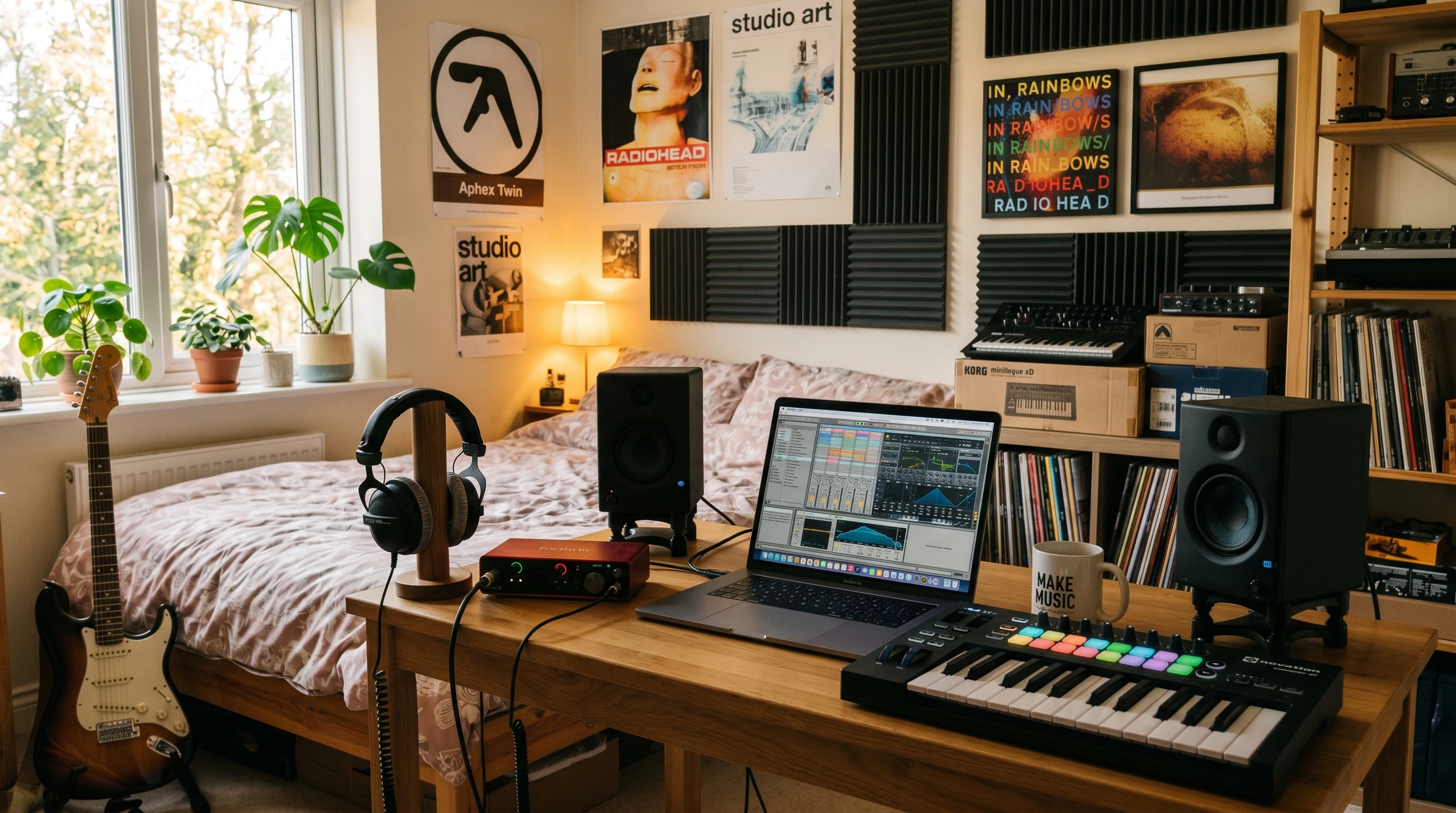
Setting yourself up with the right gear helps you avoid frustration and makes the creative process a lot smoother. You don’t need to spend a fortune or deck out a whole studio to get going. Here’s what you’ll want for a solid beginner setup:
- DAW (Digital Audio Workstation): The software where you’ll make, arrange, and edit your beats.
- Laptop or Computer: Even a midrange laptop can be enough for starters.
- MIDI Controller: Handy for playing drum parts or melodies straight into your DAW.
- Audio Interface: Connects your headphones, speakers, or mic for better sound quality.
- Headphones or Monitors: You’ll want to hear your beats clearly while working.
Understanding What Each Piece of Gear Does
Each gear item in your starter kit adds something useful to your workflow. If you’re totally new, a quick rundown makes it easier to pick what’s really helpful right off the bat.
- DAW (Digital Audio Workstation): Think of this as your main hub. You lay down your drum patterns, record riffs, slice samples, and arrange your tracks here. Some DAWs are user-friendly and come with built-in sounds and effects.
- MIDI Controller: A small keyboard or pad controller lets you play in beats and melodies instead of clicking notes with your mouse. This feels more natural for many people, especially when laying down drum tracks.
- Audio Interface: Without one, your laptop’s headphone jack might serve, but an interface seriously improves sound quality. It also cuts down on lag, which keeps everything feeling responsive while you create.
- Laptop/Computer: Beat making doesn’t demand a top-spec computer, but you do want something that can handle running a DAW without freezing up every time you load a drum kit or play a synth.
- Headphones/Monitors: Decent headphones let you hear your beats properly. If you share a space, headphones are best. Studio monitors are great if you have the room and want to hear your tracks out loud.
Simple Gear Picks for Beginners
It’s easy to get lost in the sea of gear reviews and recommendations. Here are some picks that I know are reliable, affordable, and work well for people just getting started:
- Audio Interface: The Focusrite Scarlett Solo is really popular with new producers and works with almost every DAW. The Presonus AudioBox USB 96 is another solid entry-level choice.
- MIDI Controller: The AKAI MPK Mini is one of the most popular compact MIDI controllers. It’s easy to use and fits on most desks.
- Laptop: A MacBook Air (with at least 8GB RAM) or a Windows laptop like the ASUS VivoBook or Dell Inspiron (with i5/i7 CPU and 16GB RAM) will do the trick for most beginners.
- DAW: For Windows, FL Studio is very popular with beatmakers. Ableton Live Intro is a favorite for its easy workflow, while GarageBand is an excellent free option for Mac users.
These products work reliably, are easy to set up, and have tons of learning resources online to help you out. If you want more details or the latest deals, checking the official product sites or established music shops like Sweetwater or Thomann usually helps.
Step-by-Step Beginner Beat Making Workflow
I remember my first time staring at a blank DAW session, wondering where to start. Breaking it down into these steps can help you avoid that “what now?” moment:
- Set up your DAW: Install your software, connect your controller, and get your interface plugged in.
- Pick a tempo: Hip hop sits around 85-100 BPM, trap might be 120-150 BPM, and house or EDM often runs 120-128 BPM. You can always change it later.
- Start with drums: Build a basic drum pattern using your MIDI controller or by clicking notes into the DAW’s piano roll or step sequencer. Most DAWs come with free drum sounds.
- Add melodies and bass: Try simple synth or piano chords, then add a bass line. Builtin instruments work fine here.
- Layer and arrange: Bring in more sounds gradually, experiment with different sounds, and rearrange your beat so it’s not overly repetitive.
- MIX: Adjust volume levels so everything sounds balanced and tweak as you go.
Common Beginner Terms Explained
If you’re just getting started, music production jargon can be a bit confusing. Here are some terms you’ll run into, explained simply:
- Sample: A short piece of audio, taken from a song, recording, or instrument, used as a building block in your beats.
- Loop: A section of music that repeats over and over, like a drum groove or melodic phrase.
- Quantize: Automatically nudging notes to line up exactly with the grid for tighter timing.
- BPM: Beats Per Minute, which sets how fast your track moves.
- VST: Virtual Studio Technology. These are extra instrument or effect plugins you can use inside your DAW.
Troubleshooting Common Newbie Roadblocks
I always hit some bumps when I started making beats, so if you run into problems, you’re not alone. Here are the ones that come up most often and ways to solve them:
- Sound cutting out or lagging: This usually happens when your laptop can’t keep up. Try reducing the number of plugins you’re using at once, or change the audio buffer size in your DAW’s settings.
- No MIDI sound: Make sure your MIDI controller is connected, and in your DAW preferences, set it as the input device. Also, load an instrument on the track you’re recording.
- Can’t hear playback: Check your audio settings. Sometimes you need to select your audio interface as the main output device.
- Ideas run dry: Load a preset drum loop or melody, or flip through different sounds for inspiration. Sometimes letting go of being “perfect” helps you keep moving.
Developing A Simple Practice Routine
Becoming a confident beat maker is all about steady practice. I usually find it helps to set aside time a few days a week just to mess around in your DAW, even if you don’t finish full tracks every time. Watching short production tutorials on YouTube or TikTok means you’ll pick up tips and new tricks fast.
Extra Tips for Taking Your Beats Up a Notch
Once you’re comfortable with the basics, experimenting and having fun with your workflow makes all the difference. Here’s what I found useful while improving my own beats:
- Try different drum kits: Each one inspires you in new directions. Plenty of free drum samples are out there if you track them down online.
- Use effects: Reverb and delay can give your sounds character. Compression helps “glue” things together for a more professional sound.
- Study songs you like: Drag them into your DAW, listen closely, and see how they’re arranged. Try copying the structure to spot what makes a pro beat work.
- Share your work: Get feedback by posting beats on SoundCloud, BeatStars, or even just sharing with friends. You never know where positive encouragement or helpful advice might come from.
If you want to connect with other music fans or learn specialized techniques, music producer forums and online communities like Reddit’s r/makinghiphop are full of supportive folks.
Real-World Examples of Beat Making Gear in Action
I’ve seen plenty of beginners start with a simple setup and build from there. One friend used a secondhand MacBook, GarageBand, and an AKAI MPK Mini to make beats in his dorm room. Over time, he sold a couple of beats online, saved up for better sound monitors, and eventually upgraded his software. The main thing is getting comfortable with what you have and putting it to creative use.
- Bedroom Studios: Small spaces can be powerful if you have just a laptop, headphones, and a compact MIDI controller.
- On the Go Creators: Some people use iPads with GarageBand and a small MIDI keyboard. This makes it easy to capture ideas whenever inspiration hits.
- Working Together: Teaming up with other music makers, even online, can open up new sounds and ideas. Most DAWs let you share project files or tracks with friends.
Frequently Asked Questions
What DAW is easiest for beginners?
A lot of people start with FL Studio or GarageBand. Both have simple layouts and lots of video tutorials. If you have a Mac, GarageBand is free and really easy to use. FL Studio works on both Mac and Windows and is popular with beat makers.
How do I choose between headphones and studio monitors?
If you’re in a shared space or just getting started, headphones are fine. Try something like the Audio-Technica ATH-M20x. If you have the room (and don’t need to stay silent), KRK Rokit 5 monitors are a popular beginner choice.
Is expensive gear needed to make good beats?
Nope. Great beats have been made on gear that costs less than $400 total. Focus on learning your DAW and working with free sounds at first. Upgrade slowly as you figure out what you actually need.
Wrapping Up: Getting Started with Beat Making
Beat making is all about finding your groove, having fun, and learning as you go. Start with what you can afford, build a workflow that feels right for you, and track down new sounds. The internet is loaded with free samples, tutorials, and communities where you can learn and share. The main thing is just to jump in and start creating – don’t overthink it, and remember that improvement comes with practice. If you stick with it, you’ll soon find yourself making next-level cool beats from the comfort of your own home.