Making beats on a Digital Audio Workstation (DAW) is one of those creative hobbies that pulls you in and keeps you hooked, whether you want to mess around with rhythm just for fun or you’re planning to release your songs online. DAWs might look a bit intimidating at first, but once you get the hang of the basics, the process becomes way more fun and intuitive. Here’s my step-by-step guide to using a DAW for beat making, tailored to help you jump in without feeling overwhelmed.
Understanding What a DAW Does for Beat Making
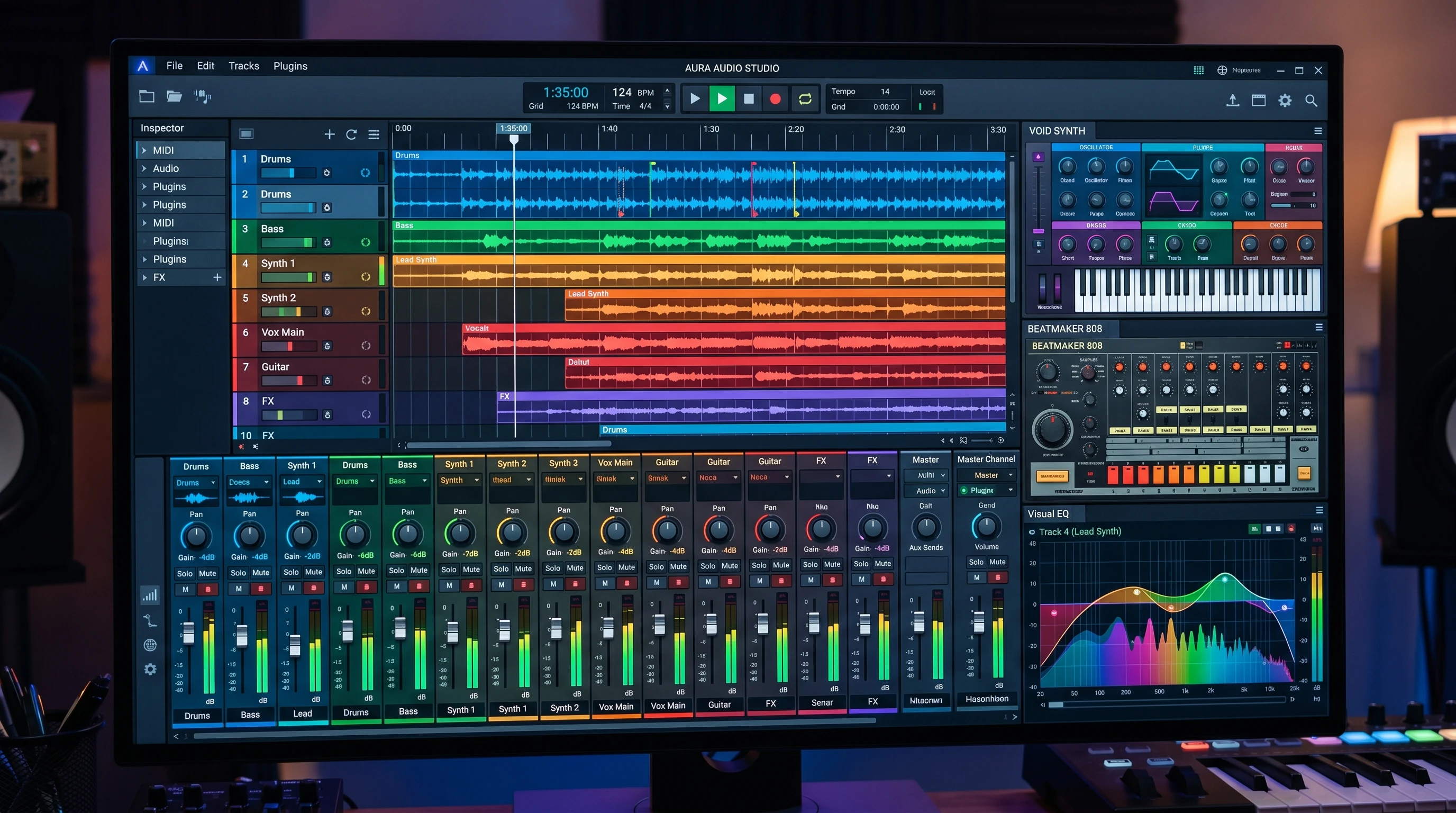
A DAW is basically your allinone music studio, packed into your computer. Popular options like FL Studio, Ableton Live, Logic Pro, and GarageBand come loaded with everything you need to make beats—from virtual instruments to audio effects and mixing tools. They’ve replaced oldschool gear like tape recorders and mixing boards, making music production way more accessible.
Producers use DAWs to record, arrange, edit, and polish music tracks. When you’re beat making, you’ll spend a lot of time laying down drum patterns, adding synths, playing with samples, and mixing everything together. You can layer sounds, swap instrumental parts, and tinker with different production ideas all within that one program.
Getting Started: Setting Up Your DAW
First things first, download and install a DAW that works on your computer or device. FL Studio is a beginnerfriendly favorite, but if you’re on a Mac, Logic Pro or GarageBand are also pretty handy. Each DAW has its own look and feel, but most of them follow the same layout concepts:
- Main Window: The central area where you arrange your tracks and build your song structure.
- Track Lane: Where your audio and MIDI clips are lined up horizontally.
- Mixer: Lets you balance levels and pan, plus add effects for extra polish.
- Browser or Library: Where you find your synths, drum kits, samples, and project files.
I suggest spending a little time clicking around to get comfortable; drop a few loops, tweak some knobs, and get a sense of how things work before jumping into a fulllength project. It’s all about feeling at home with the workspace so you’re not lost when you want to make an idea happen quickly.
Core Features to Know Before Making Beats
Before you start building your first beat, there are a few essential DAW features worth getting familiar with:
- Piano Roll: This is where you draw in or record MIDI notes, the backbone for creating melodies, chords, and drum patterns.
- Step Sequencer: A grid tool for programming drum patterns. It’s usually super easy to visualize and test rhythmic ideas here.
- Looping: Lets you play a specific section on repeat so you can focus on getting it right before moving on.
- Quantization: Snaps offbeat notes to the closest timing grid, which helps everything sound tight and professional.
- Effects (FX): Processors for reverb, delay, distortion, compression, and more; these tools help shape your sounds in unique ways.
Getting a feel for how these parts work will make it much easier to lay down beats and build songs that feel cohesive. The more you use them, the more confident you’ll become in bringing your musical ideas to life.
Step-by-Step: Making Your First Beat In a DAW
Once you’re comfy with the interface, building your first beat gets a lot easier. Here’s a simple workflow that works in most DAWs:
- Choose a Drum Kit: Find a kick, snare, hihat, and any other percussion you like in your DAW’s sound library or an imported sample pack.
- Set the Tempo: Choose your BPM (beats per minute). Hip hop might sit around 80 to 100 BPM, while dance beats are often faster at 120 to 130 BPM.
- Lay Down the Kick and Snare: Start with a basic rhythm. Put kicks on beats 1 and 3, snares on 2 and 4, or whatever matches your style.
- Add HiHats & Percussion: Use 1/8th or 1/16th notes for steady hihats. Add rolls or stutters for more motion.
- Build a Bassline: Drop in a bass synth or sample, keeping it locked in with the kick drum groove.
- Add Melodies and Chords: Layer synths or samples for hooks and musical fills. Even simple melodies can take a basic beat up a notch.
- Arrange Into Sections: Copy, paste, and mute tracks to create different sections. Intro, verse, chorus, bridge, and outro.
- Apply Effects: A touch of reverb on the snare, delay on the melody, or sidechain compression on the bass can add that final polish.
After a couple tries, the process gets a lot faster, and you’ll start coming up with your own workflow. Don’t stress if your first beats are rough; that’s totally normal! Each project helps you learn and get a better sense of how you like things to sound.
What to Think About Before You Get Into It
Beat making with a DAW is easier than ever, but there are a few things to keep in mind that can help speed up your progress:
- Computer Performance: DAWs can use a lot of system resources. Check your laptop or desktop against minimum requirements before installing new software.
- Audio Interface: If you want to record live instruments or vocals, having a dedicated audio interface gives you much better sound quality than plugging into your computer’s headphone jack.
- MIDI Controller: Playing drums or keys with a MIDI keyboard or pad controller can make the process feel way more musical and handson.
- Sample Packs: Fresh drum kits and sample collections can really give a boost to your creative options. Tons of free and paid packs are available online; just make sure to check licensing if you plan to release your music commercially.
- Headphones or Monitors: A decent pair of headphones or speakers helps you actually hear the details in your beats. Even a good pair of studio headphones is plenty to get started.
If you want to get serious later, look up upgrade options for your audio interface or headphones. They’re not essentials, but as you improve, better gear helps you spot subtle details in your beats.
Latency and Workflow
Sometimes hitting a pad or key doesn’t trigger a sound instantly. This lag, called “latency,” is mostly solved by setting your audio buffer size low in your DAW’s preferences or by using an audio interface. Adjusting these settings helps keep everything in time, which is super important when recording new sounds or experimenting with rhythms.
Learning Curves and Shortcuts
Every DAW has its quirks. I found it helpful to watch a few YouTube tutorials or check the manual for specific hotkeys and workflow tips. Simple tricks like copy/paste, duplicate, or hiding unused tracks save a lot of time as your project gets more complex. There are forums and online communities where you can ask questions and learn tips from experienced users too.
Tricks and Tips for Leveling Up Your Beats
I’ve picked up some practical tips that make beat making in a DAW way more fun, especially when you’re just starting out:
Experiment With Swing and Groove: Don’t be afraid to nudge notes or add groove templates. Rigid, robotic drums are good for EDM, but hip hop and funk come alive with a looser feel.
Resample and Chop: Dragging audio clips back into your project to reprocess, reverse, or slice them creates new textures and keeps things interesting. Chopping up samples is a great way to put your own spin on a sound.
Save Presets and Templates: Save drum kits, instrument patches, or blank session templates so you can jump right back in later without starting from scratch each time.
Automate for Dynamic Changes: Drawing automation curves for effects or instrument volume changes adds life to static beats, bringing filters in and out, or pushing reverb only during certain parts.
Seek Out Feedback: Play your tracks for friends or share online. Honest feedback is super helpful for learning and figuring out what really connects with listeners. Online beat battles or feedback groups can help you stretch creatively.
Useful Gear and Tools for Beginner Beat Makers
Getting your setup right can really change how much you enjoy making music. Here are a few things I recommend to anyone just getting started:
- DAW (Digital Audio Workstation): Core to everything. Pick one that feels intuitive and fits your budget. Most offer free trials so you can test them out.
- MIDI Controller: Makes playing and experimenting with new sounds smoother. Even a tiny 25key model is super handy.
- Audio Interface: Great for adding vocals or live instruments later on.
- Studio Headphones: For clear monitoring; lets you make out all the little details in your mix.
- Sample Libraries: Drum and sample packs give you tons of instant inspiration.
Consider a portable recorder if you want to capture your own field samples. Even your phone’s voice memo app can be a quick way to snag unique sounds and blend them into your tracks.
Frequently Asked Questions
These are probably the most common things I’m asked by friends getting into DAWbased beat making:
Question: Which DAW is best for a beginner making beats?
Answer: You can’t go wrong with FL Studio or GarageBand if you’re just starting out; they’re easy to use, but Ableton Live and Logic Pro are worth checking out once you’re comfortable.
Question: Do I need a MIDI keyboard or controller?
Answer: You don’t need one, but it makes playing in rhythms and melodies a lot more fun and natural once you’ve got the basics down. Many producers use their mouse and keyboard at first, but physical controllers let you explore a more hands-on side of beat making.
Question: How do I get my beats to sound professional?
Answer: Focus on clean drum patterns, tight mixing, and using highquality samples. Tweaking effects and getting feedback on your mixes also helps your music sound polished.
Ready to Make Your Own Beats?
The best way to get comfortable in a DAW is by making as many beats as you can, even if some projects never get finished. Each attempt teaches you something new. Have fun checking out different tools, and don’t be afraid to experiment. The more you play around, the better your tracks will sound. Beat making is one of those skills that grows with every session; enjoy every moment of the adventure and keep track of your progress along the way!