Beat making has taken music production to a whole new level. Whether you produce hip-hop, trap, EDM, or experimental tracks, dialing in on advanced techniques can make a track stand out. When starting out, it’s easy to get comfortable with basic drum patterns or loop slicing, but if you’re looking to build dynamic, polished beats, going beyond the basics is really important. I’m breaking down some advanced beat making techniques, tricks I’ve learned along the way, and useful tips to take your tracks up a notch.
Why Try Advanced Beat Making Techniques?
Once you’re comfortable with building basic loops and patterns, things can start to feel repetitive. Advanced beat making goes beyond dropping a kick and snare into the grid. It blends creativity, sound design, rhythm manipulation, and technology to spark inspiration. The digital tools for beat making keep getting smarter, letting you experiment with polyrhythms, syncopation, automation, and unique processing. Chasing advanced techniques isn’t about making everything complicated; it’s about having more creative control and a bigger toolkit to express your musical ideas.
Music producers working in modern genres are getting more adventurous with beat choice, groove, and sound manipulation. Algorithms in popular DAWs (digital audio workstations) and new hardware samplers are making it easier to break traditions and invent new sounds. It’s worth checking out how these techniques shape the music landscape and help you find your own unique vibe. And, embracing these cutting-edge approaches can lead to unexpected breakthroughs. Exploring these methods opens up an endless playground to let your personal style shine through and set your beats apart from the crowd.
Essential Tools for Advanced Beat Making
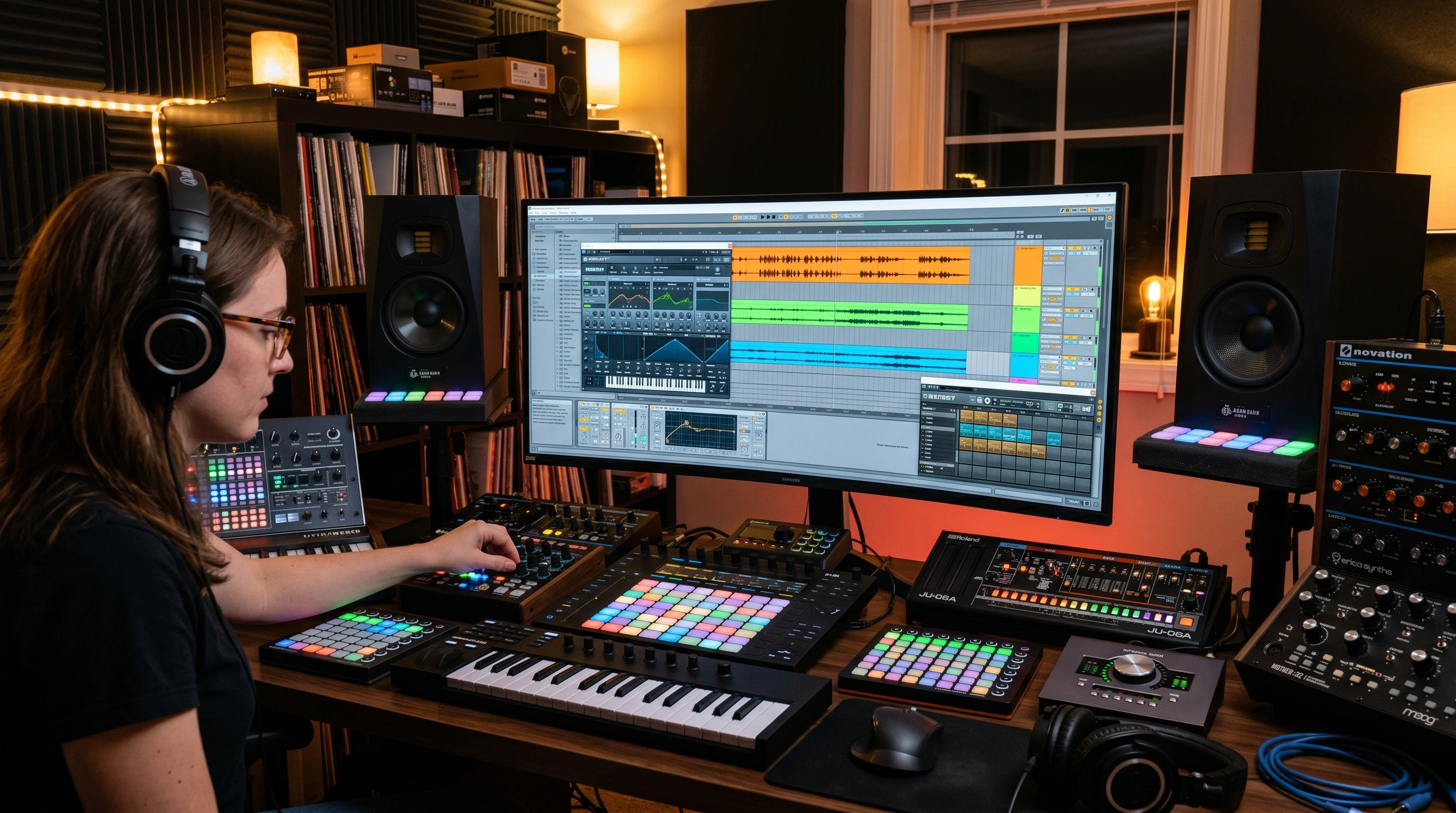
Before going any further, having the right setup makes experimenting easier and more fun. Here’s what I keep at arm’s reach when jumping into advanced workflows:
- DAW (Digital Audio Workstation): This is where everything comes together. Ableton Live, FL Studio, Logic Pro, and Bitwig Studio all offer cool MIDI workflows, automation options, and effects plugin support.
- MIDI Controller: Having a pad controller, keyboard, or grid controller (like Novation Launchpad or Ableton Push) lets you record rhythm ideas by hand, instead of clicking notes in with a mouse.
- Audio Interface: Useful for connecting mics, instruments, or recording from vinyl/samplers with high quality sound.
- HighQuality Samples & Drum Kits: Collecting unique, professionally recorded samples gives your beats more punch and originality.
- Effects & Sound Design Plugins: Plugins like granular synthesizers, bitcrushers, resonators, and modulated delays are super useful for shaping new textures.
Having a comfortable workspace and keeping your samples organized also helps you to stay in the creative zone and makes it easy to build unique sounds quickly. Don’t overlook the value of good studio headphones or monitors, as hearing the fine details in your beats can really help with mixing and crafting next-level cool drum sounds.
Building Grooves with Advanced Rhythmic Techniques
Once your setup is ready, getting into more complex rhythm tricks can help your beats stand out. Rhythm is the backbone of any good beat; stretching beyond simple patterns adds depth and character.
- OffGrid Programming: Moving drum hits slightly off the perfect grid adds a human, loose feeling. Try shifting snares or hi-hats a few milliseconds late or early, which can add groove without getting messy.
- Polyrhythms: Layering two or more rhythms with different time signatures (like a 3-over-4 pattern) adds a twist to traditional 4/4 beats. Programming polyrhythmic percussion, shakers, or melodic elements can spice things up and keep listeners’ ears guessing.
- Ghost Notes & Velocity Variation: Adding ghost notes, softer, in-between hits, fills out a beat. Speaking personally, lowering the velocity (not volume) of certain hi-hats, kicks, or snares makes the beat less robotic and more dynamic.
- Syncopation: Placing hits on the weaker beats of the bar (rather than strictly on 1, 2, 3, 4) helps a groove bounce and swing. Try programming percussion that falls between the major beats for a fresh sound.
Experimenting with microtiming and layering rhythmic textures fuels creativity in beat making. Add in swing, shuffle, or random selection of steps for that extra edge. Small variations can make even a minimal beat come alive.
Creative Drum Sound Design
Drum selection and processing are a big part of advanced beat making. Here’s how I like to push my drum sounds for more character:
- Layering Drums: Stack two or more kick, snare, or clap samples together. Adjust the envelope, pitch, or EQ on each so they mesh without making mud. Layering brings punch and depth, so your drums hit harder in the mix.
- Resampling: Bounce your whole drum bus to audio, then chop and reprocess it. Pitch it up or down, distort it, or reverse tiny bits to create something new from your own sounds.
- Experimental Processing: Try using plugins like bitcrushers, tape emulators, or even guitar pedal effects on drum sounds. Modulation effects (like phasers or flangers) on hi-hats can add movement.
- Foley and Field Recording: Drop in audio you recorded around your house, like keys jingling or a cupboard closing, for natural percussion textures. Not only does this sound fresh, but it makes your beats more personal.
Don’t be afraid to break the rules when shaping your drum sounds. Try blending synthesized percussion with acoustic samples or layering odd effects. That’s often where signature sounds are born. The creative process should be playful; happy accidents—like an effect chain you didn’t expect—can spark next-level cool ideas for your signature drum palette.
Advanced Drum Programming and Sequencing Techniques
- Step Sequencer Tricks: Most DAWs give you step sequencers, so try programming shifting patterns using probability (certain hits don’t always play) or polyrhythmic lanes (where different drum sounds cycle at different rates).
- Automation: Automating effects like filter sweeps, reverb throws, and distortion changes throughout a track adds excitement and variation. I like drawing in automation on hats or snares for interesting buildups and breakdowns.
- Randomization Tools: Use plugins or built-in DAW features that randomize velocity, timing, or sample selection. This keeps grooves feeling natural and lets happy accidents spark new ideas.
- Live Finger Drumming: If you have a pad controller, finger drumming your patterns in real time adds texture and uniqueness to your tracks. Even if you quantize afterward, you’ll capture a human feel.
Differentiating between tightly programmed sections and looser, more jammed-out verses can make your tracks more engaging. Use song structure to build tension by ramping up automation or layering sequencers in creative ways. The flexibility of modern DAWs lets you get experimental, arranging beats visually, audibly, or even randomly, expanding your sound toolkit every session.
Sound Selection and Sampling Tricks
Great beats often come from unusual sound choices. Here are some approaches that can help you build memorable, original beats:
- Chopping and Rearranging: When sampling from records or sample packs, cut up drum breaks or melodic phrases. Rearrange slices to build something new. Even subtler changes can make a big difference.
- Pitch & Time Manipulation: Change the pitch and stretch or compress samples in time for gritty effects. Modern DAWs make it easy to time-stretch while keeping pitch, or to get that classic sped-up/screwed sound by linking pitch and tempo.
- Using NonDrum Sounds: Turn synth hits, vocal bits, or weird audio snippets into percussion. Resample anything that catches your ear and try dropping it onto the off-beats for cool, spontaneous grooves.
When working with samples, try layering subtle effects like reverb, delay, or saturation to blend them into your beat. Little touches like automating a filtered vocal chop or reversing elements at key points can create unexpected magic; sampling is the art of stumbling upon moments that spark emotion or excitement.
Layering, Mixing, and Arranging Beat Elements
Building a catchy, advanced beat isn’t only about programming; it’s also in the way sounds fit together:
- EQ & Frequency Separation: Use EQ to clear out clashing frequencies. For example, I usually cut low-end from hats and snares, making room for the kick to sit cleanly.
- Sidechain Compression: Duck everything (especially bass lines) slightly when the kick hits to keep the groove tight and give the drums space.
- Creative Panning: Send percussion or melodic snippets left and right to fill out the stereo field. Automated panning rides can make beats come alive in headphones.
- Arrangement Variation: Change up drum patterns every eight or sixteen bars. Drop out elements, bring in new percussion, or change sounds to keep the beat interesting throughout a track.
Before finalizing your arrangement, bounce a rough mix and listen away from your studio for a different perspective. Sometimes an extra tambourine or a wider pad can make a section pop. Keep experimenting, as the mixing and arranging stages are where your beat really finds its groove and identity.
Questions Producers Ask About Advanced Beat Making
Q: How important is music theory for advanced beat making?
A: Music theory helps with melody, harmony, and rhythm, but you don’t need to be an expert. Understanding common rhythms and knowing your scales can speed up your creative process, especially for layering melodic elements on top of beats.
Q: What’s a good way to avoid “beat block” when experimenting?
A: Try switching up your workflow: start with a melody instead of drums, use a random sample, or set a timer to make a beat in 20 minutes. Sometimes limiting your options sparks new ideas.
Q: How do I find my own sound as a beat maker?
A: Dig into as many genres and techniques as you can. Rework classic patterns, try out weird plugins, sample everyday sounds, and listen for beats that catch your ear. Over time, you’ll develop personal habits and a recognizable vibe.
Practical Applications and Real-World Examples
Many top charting producers use these techniques in their tracks. For example, artists like Flying Lotus and J Dilla are well-known for their swing-heavy, offgrid rhythms, while electronic producers like Flume and Hudson Mohawke layer unique sounds and use experimental processing. Studying their tracks and even recreating similar beats (as a practice exercise) helps to learn how these techniques operate in real beats, and not just in theory.
- HipHop: Loose, swung rhythms with creative sample flips define modern hiphop. Syncopation and ghost notes add a ton of personality.
- Trap & EDM: Heavy use of rolling hi-hats, tuned 808s, and noisy risers built with automation and layered samples make drops more impactful.
- Experimental/LoFi: Layering foley, microedits, and intentional imperfections (like vinyl hiss or offgrid hits) builds vibe and keeps listeners’ attention.
Try referencing these key artists and take note of unique fills, unexpected layers, or transitions. Even subtle techniques like vinyl crackle or reversed drum fills can add authenticity to your beats and teach you new ideas for your own projects.
Final Thoughts on Advanced Beat Making
Exploring advanced beat making techniques unlocks new creative options. Bringing in tricks like polyrhythms, ghost notes, sample manipulation, and creative layering breathes life into your tracks. If you’re serious about beat making, set aside time every week to try new patterns, experiment with sound design, and have fun with processing. After some trial and error, you’ll notice your beats get tighter, more exciting, and catchier, making production sessions a lot more rewarding in the long run. There’s always something new to try—staying curious ensures your beats continue to surprise both you and your listeners.