Beat production in 2026 is a completely different ball game than just a few years ago. It doesn’t matter if you’re crafting tracks in your bedroom studio or building up something in a pro space—having the right gear can really give your workflow a boost and make things way more enjoyable. With tech changing so fast, it’s easy to feel swamped by all the new tools, wild software, and hybrid gadgets flooding the market. Let’s break down my top choices for gear that’s actually worth considering if you want to cook up killer beats in the coming year.
Starting Your Beat Production Setup: What You’ll Really Need in 2026
Beat production is all about turning ideas into music with as little friction as possible. The gear you pick should make your process smoother and get you excited to try new things. In 2026, producers are spoiled for choice, but a handful of essentials really stand out for pure reliability and workflow boosts.
Computers are getting slimmer and quicker than ever. MIDI controllers now bring next-level cool features. Audio interfaces have become much more dependable and easy to use. Studio headphones keep stepping up, letting you spot every tiny mix detail. Getting comfortable with these cornerstones helps you put together a fresh setup that matches your vibe, wallet, and creative ambitions.
I’ve seen beatmaking switch up big time—from bulky desktop towers to lightweight, backpack-ready rigs. Laptops now run nearly silently, interfaces are the size of your hand, and modern plugins let you churn out pro-level tracks anywhere. Getting your hands on gear that just works means less tech hassle and more time actually upping your music game.
Essential Hardware for Beatmaking
There’s a ton of gear you can mess around with, but these hardware staples make up the backbone of almost every solid beat production setup today:
- Reliable Computer: Making beats in 2026 pretty much means working “in the box.” The Apple MacBook Pro is the go-to for tons of producers. The M-series chips handle even the busiest projects with stacks of virtual instruments and heavy effects, and they stay cool and quiet. The battery lasts for hours, perfect if you want to move around while producing. Just be sure you’ve got enough RAM and storage space to manage big sample stashes.
- MIDI Keyboard Controller: Your MIDI controller is the bridge to your DAW and sounds. The Novation Launchkey MK4 is a top pick: it offers great integration with popular DAWs, slick touch-sensitive pads, and a super simple layout. Auto-mapping on the MK4 speeds up idea capture and lets you change parameters without a hitch. If you love finger drumming or triggering sounds on the fly, those pads are made for you.
- Audio Interface: The Focusrite Scarlett 2i2 is basically everywhere for a reason. The 4th gen version steps up their already excellent preamps, sounds great, and keeps latency in check. Whether you plug in mics, synths, guitars, or run monitors, the 2i2 makes it easy. It’s rock solid and easy to use, which is gold for both newbies and seasoned producers.
- Studio Headphones: Audio Technica’s ATH-M50x cans have superstar status—and for good reason. They’re comfy, last ages, and let you make out every detail in your mix. The latest model brings wireless features and softer ear cushions so you can go even longer without ear fatigue.
Starting with these basics helps you focus on learning music production, not fighting tech headaches. Each one checks the boxes for quality and smooths the way for making tunes—it’s a winning combo for today’s beatmaker.
Choosing the Right Software: DAWs and Plugins
When it comes to beat production, software is the absolute heart. The flashiest hardware won’t get you far if you don’t have a solid platform for laying down, editing, and mixing your beats. Here’s what you should keep an eye on right now:
- Digital Audio Workstation (DAW): FL Studio is still king for beatmakers. Its interface is easy for first-timers but is packed with powerful arrangement and editing options. Pattern-based sequencing and drag-and-drop goodness keep your workflow moving, while features like real-time stretching and creative routing shape your sound exactly how you want. The 2026 update brings clever AI sample sorting and one-click stem exports—massive time-savers for everyone.
- Virtual Instruments and Effects: FL Studio’s bundled plugins have seriously grown up, but you’ll want to check out some of the new synths and samplers out there. Bundles now often come packed with everything a new producer needs—killer sample packs, digital drum machines, analog emulation synths, and effects that crank up your creativity. AI-powered mastering plugins are all the rage and can make your mixes shine with barely any learning curve.
- Sample and Loop Libraries: Samples fuel beat creation, so fill your toolkit with high-quality, royalty-free sounds. Many sample packs now bring stems and MIDI files, letting you remix and rework any idea however you like. FL Studio users will love the new “Sample Browser,” which tags and organizes your sounds as you record or drag them in.
Your software choices really come down to your taste, but FL Studio keeps winning people over as an easy, user-friendly launchpad for anyone who wants to jump right into making beats. Plus, the flood of tutorials means you can track down tricks and tips whenever you hit a creative wall.
A Few Things to Think About Before Buying Gear
Picking the right production gear can get overwhelming, especially with all the features and marketing thrown at you. Here’s how to make choices that will help and not hold you back:
- Compatibility: Always double-check that your intended gear plays nicely together. MacBook Pros handle just about everything, but you’ll still want to check for driver support, especially if you’re using the latest USB-C gadgets or wireless tech.
- Workflow: If you love finger drumming, put a controller like the Launchkey MK4 high on your list. If you mostly write keys or layer samples, make sure your MIDI board offers enough keys and touches for your needs.
- Budget: No need to go all-in at once. Start with just the essentials—laptop, headphones, interface, controller—then upgrade when your workflow grows or your music takes off.
- Durability & Portability: If you plan to travel, grab gear that’s built to move. The latest MacBook Pro and ATH-M50x headphones travel light, and the Scarlett handles bumps and dings like a champ.
Taking time to look over options saves you from second-guessing purchases and keeps your process stress-free.
MIDI Controller Features to Look For
MIDI controllers are getting way smarter. Some features to check out this year:
- Rotary knobs and sliders for on-the-fly mixing and tweaking effects.
- RGB drum pads for colorful, responsive finger drumming and fast sample triggering.
- Built-in arpeggiator and scale or chord modes, which help you write catchy basslines and melodic hooks even if you haven’t got theory down cold.
- Deep, seamless hookups with leading DAWs for a plug-and-play experience.
The Novation Launchkey MK4 wraps all these into one flexible board, keeping it at the top of wish lists for many beatmakers.
Typical Beat Production Studio Layout
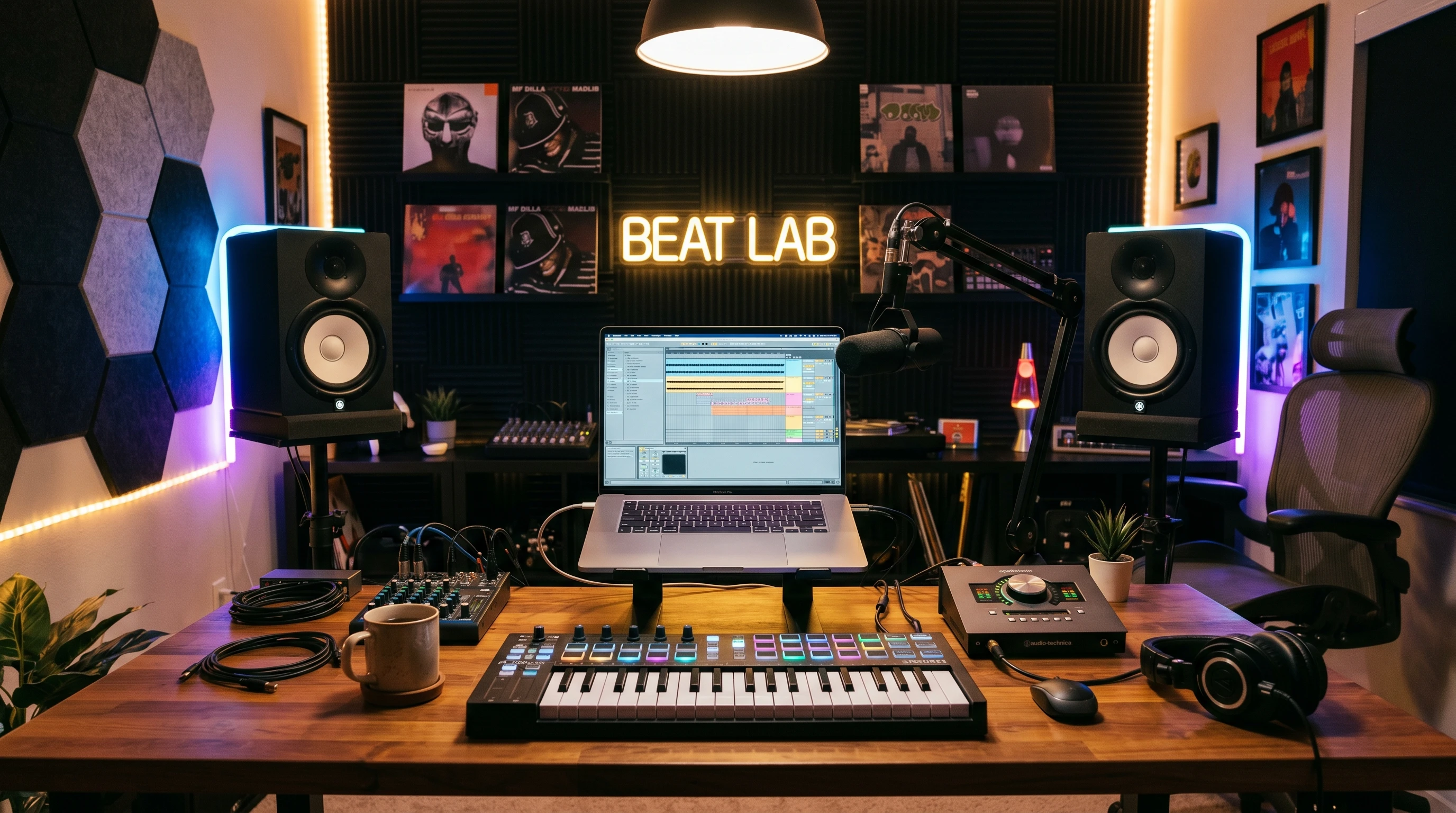
A work spot that’s comfortable and clutter-free can make a world of difference. Here’s a layout I’ve seen work for plenty of producers:
- Laptop sitting front and center so you can work your DAW without stretching.
- Your MIDI controller is laid out right in front, making it easy to throw down ideas on the fly.
- Audio interface tucked to one side to keep cable chaos under control.
- Headphones on a hook or stand; add a set of compact monitors if your space allows to double-check mixes.
Simple LED ambient lights and a few acoustic foam tiles not only set the creative mood but also help tone down harsh room reflections—even in a tight space.
Common Questions for 2026 Beat Producers
Some questions come up over and over from people just jumping into beatmaking:
What’s the best DAW for new beatmakers?
FL Studio is tough to top for smooth workflow and quick learning, though Ableton Live and Logic Pro are still popular. Download the trials and play around with all three to see what gets you inspired.
How important is using an audio interface?
Even if headphones are your only monitors, a solid interface like the Scarlett 2i2 gives you cleaner audio, less lag when playing VSTs, and a tighter feel for recording. Seriously, don’t skip this—it makes a bigger difference than you might think!
Can I make pro-sounding beats without expensive gear?
No doubt about it. Entry models these days bring you really close to pro territory. Your skill and creativity make the real difference, not how much you spend. Put your time into learning and experimenting rather than endlessly grabbing new gear.
Should I use headphones or monitors?
For most starting out, great headphones like the ATH-M50x fit the bill just fine. Monitors are awesome, especially if your room’s treated, but not a must at the beginning.
Final Thoughts
Pumping up your beat production arsenal for 2026 is all about locking in what helps you stay motivated and productive. Picking the right combo of laptop, controller, headphones, interface, and DAW sets your foundation. Don’t get lost chasing every shiny new release—great music comes from really knowing your setup and stretching yourself creatively.
Keep making and keep enjoying the ride!