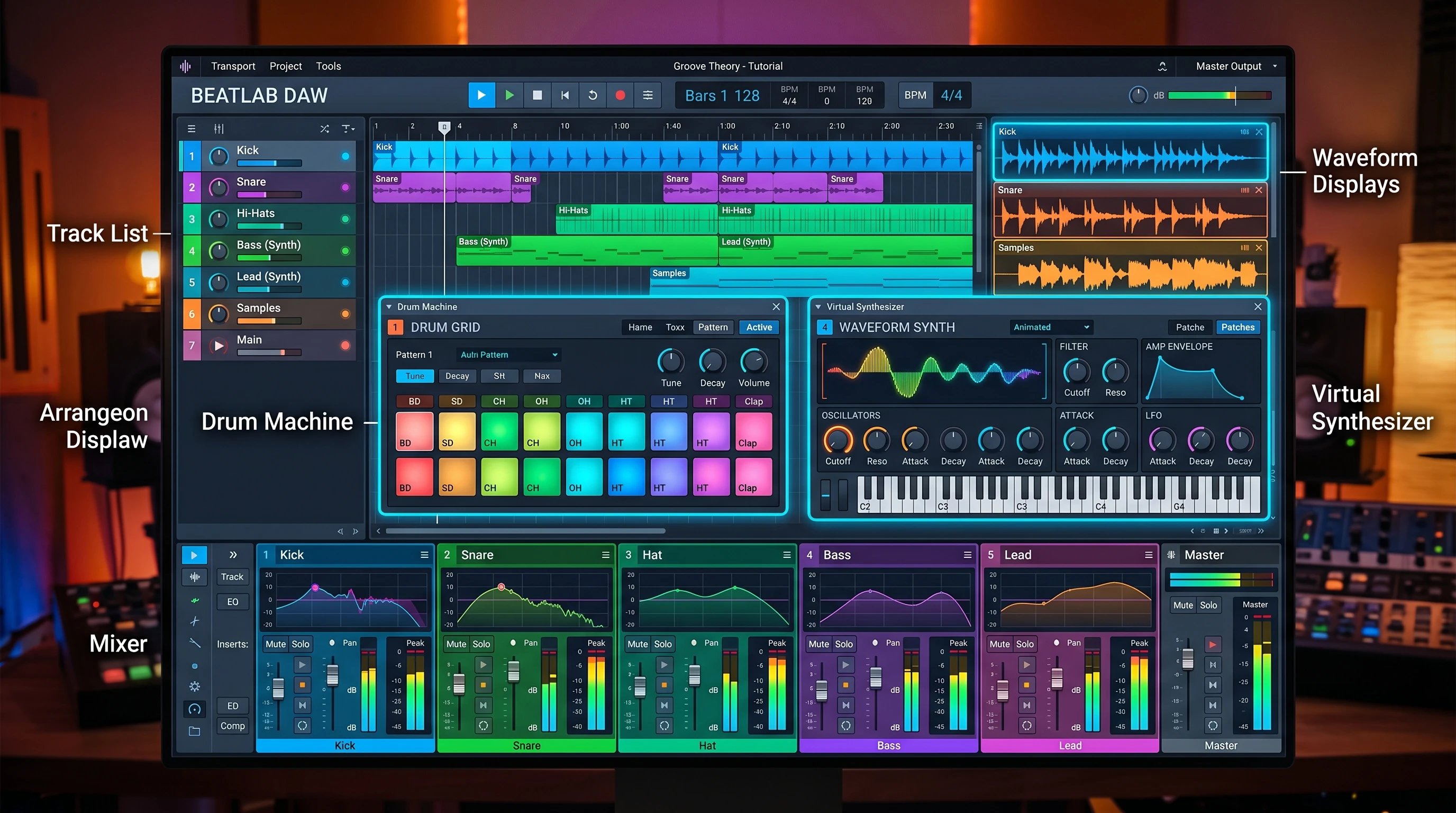
 Jumping into music production is a blast, but it can also feel a little overwhelming when you’re first starting out. Trying to put together your own beats with so many tools, sounds, and ideas flying around is a lot to handle. I remember I used to overthink every little step, but with practice and some helpful tips, creating catchy beats started to make a lot more sense.
One thing that made a big difference for me was working with Reason Studios as my DAW (Digital Audio Workstation). The workflow just clicked, and the built-in instruments and effects make playing around with ideas a lot of fun. If you’re brand new, or even if you’ve just started dabbling, these beat-making tips can help you move from stuck and confused to confident and creative in your own process.
This guide is packed with hands-on advice for getting started with beat making, focusing on learning the tools, crafting cool drum patterns, mixing, and more. If you’ve got your DAW open (especially if you’re using Reason Studios), these are the steps I’ve found that make the whole experience way smoother and more enjoyable.
1. Laying the Groundwork: Know Your DAW and Sounds
Getting to know your DAW is pretty important. I’m all about Reason Studios for beat making. The rack-based approach, easy drag-and-drop effects, and device chaining let me test out ideas fast. Even if you’re using something else, the first big step is learning your own DAW inside out. The more comfortable you are, the faster your creativity will flow.
Basic Beat Making Gear:
- Reason Studios with some stock drum kits ready to go.
- Headphones or monitors for accurate playback.
- A simple MIDI keyboard or drum pad (totally optional, but makes sketching beats quicker).
Get Comfortable With These in Reason:
- Redrum Drum Machine and Kong Drum Designer for drum sequencing.
- Sequencer view for arranging patterns and loops easily.
- Browser panel for grabbing samples or instrument presets quickly.
- Mix Channel for basic mixing controls while you’re building beats.
Spend time just loading kits, tapping out patterns, changing sounds, and getting used to how things work. Once you feel comfortable with the basics, you’ll create beats way faster and with less stress.
2. Starting Simple: Build a Drum Groove That Hits
Every beat starts with a simple drum groove. Early on, I would get lost trying to make things complex before I had a solid loop. Best thing I learned? Start basic. Lay down kick, snare, and hi-hat or shaker. Get that tight first, then start layering sounds in as the energy builds.
Tips for Catchy Drum Patterns:
- Count everything in 4s (like 1-2-3-4) or 8s if you want a longer groove.
- Put your kick on the 1 and 3, and snare on the 2 and 4 for that classic hip-hop or pop feel.
- Hi-hats can sit on every beat, or every other beat for a chill vibe.
- Keep it simple for at least 8 bars, so you don’t get overwhelmed.
Try This in Reason:
- Open Redrum and load up a preset drum kit.
- Lay down a kick on steps 1 and 9, a snare on 5 and 13, and fill in hi-hats across the grid.
- Listen to your groove. Tweak timing, change out drum sounds, and start feeling the rhythm.
Once your groove feels right, try moving one or two hits slightly off the grid for some swing and human feel. Reason’s shuffle control in Redrum is super useful here for giving your beat more movement. Try changing velocities for added dynamics.
3. Layering Melodies and Basslines
Once you’ve got a basic drum groove, adding a bassline and melody really brings things to life. You don’t need to know advanced music theory. Just hum or tap out something simple and repeatable. Use your intuition—if it sounds good, it is good!
How I Approach Bass and Melody:
- Pick a bass instrument (like Subtractor or Monotone in Reason) and play a few notes in the same key as your drums. Short and bouncy lines usually work great for hip-hop and trap.
- Add a melody with a synth like Thor or Europa. Start with just three or four notes that you can hum or whistle easily. Remember, simple hooks stick better.
- Experiment with layering. Try doubling your melody with another instrument, or throwing in a counter melody for some flavor and variety.
Helpful Practice:
Mute parts and play around with different instruments until you track down what fits. Sometimes the right sound pops out in the most random way. Don’t be afraid to reverse samples, add weird effects, or even turn a melody into a background pad with lots of reverb.
4. Use Effects and Automation for Dynamics
Adding effects is where your beats start to feel bigger, wilder, and more interesting. Reason’s effects rack is packed with stuff like reverb, delay, distortion, and filtering. Beginners can drag and drop these into a chain and mess around until things sound eye-catching and unique.
Easy Effects to Try:
- Add reverb to snare hits for space and depth in your mix.
- Drop a delay on a melodic line so it echoes and fills out the sound.
- Use an EQ to carve out mud from your bass or drums for clarity.
Automation Tips:
Automate volume, filter sweeps, or delay throws to keep the track interesting across different sections. You can record your knob movements in real time, or graph them in the automation lane. Reason makes this easy—just right-click almost any knob or slider and pick “Edit Automation.” This keeps your beat from feeling static or repetitive and lets you step up your production game.
5. Arrange Your Beat: Build Energy and Drops
A finished beat needs movement, not just the same loop repeating over and over. Arranging is where you turn your patterns into a full track. Think about subtle tempo changes, dramatic drops, and building tension for big sections. A well-arranged song keeps listeners hooked from start to finish.
Beat Arrangement Starter Moves:
- Start with a short intro—maybe just drums and a filtered melody.
- Drop in your full pattern on the chorus or “hook” section.
- Break it down for verses (mute some drums or bring in a new melody).
- Add small fills or drum rolls to transition smoothly between sections.
- End with a quick outro. Sometimes just fade things out or strip the beat down to the essentials.
Reason’s sequencer lets you drag and duplicate sections, mute channels, and move things around easily. Mess around until the energy flows the way you like. Don’t be afraid to try song structures from your favorite tracks for inspiration.
6. Mixing and Mastering for Maximum Impact
Even the best beat falls flat if the mix isn’t right. Mixing is about balancing levels, keeping the groove tight, and making sure each sound has its space. Mastering brings the volume up to commercial standards and glues everything together so your listeners get a professional impression.
Mixing Tips That Help:
- Keep the kick and bass out of each other’s way. Try high-passing one or use sidechain compression so the bass ducks when the kick hits for extra punch.
- Pan sounds (like hi-hats or synths) left and right for a wide and engaging mix.
- Add a little compression to drums for impact, and use a touch of reverb to create depth and dimension.
- Don’t solo tracks for long. Always check your mix with everything playing together for best results.
Mastering Starter Advice:
- Use Reason’s mastering suite for basic EQ, compression, and limiting. Try to get the track hitting right up to 0dB without distorting your audio.
- Compare your master with a reference track you like. If your beat sounds muddy or dull, check the low end and overall balance and tweak as needed.
I always come back to my beat with fresh ears the next day before doing a final mix or master. Small adjustments can make a huge difference—so give yourself time to reset your perspective.
7. Staying Inspired and Avoiding Blocks
New producers hit creative walls all the time. I’ve found that swapping out drum kits, using random samples, or remixing someone else’s beat in Reason gets the ideas flowing again. Sometimes just walking away for ten minutes and coming back with fresh ears helps, too. Inspiration often shows up when you least expect it, so stay open to experimenting with new approaches.
Quick Ideas When You’re Stuck:
- Resample your beat and chop it up again in a new way.
- Try working in a completely different genre for a session and see what surprises pop up.
- Follow a YouTube tutorial in Reason and copy their beat just for practice—it helps you learn new tricks and keeps your workflow interesting.
Common Questions From New Producers
Should I buy new plugins or packs right away?
I recommend sticking with Reason’s stock sounds while you learn. Once you know what you want to add to your setup, then buy what makes sense for your needs and workflow.
How do I get my beats to sound professional?
- Focus on solid drum grooves, tight mixing, and learn the mastering basics.
- Reference your favorite tracks and compare how your beat hits in headphones, speakers, and even your phone. Adjust accordingly for the best results.
What if I don’t know music theory?
Use your ears, and don’t be afraid to experiment. Drag notes around in the sequencer, copy melodies you like, and keep things simple. Practice helps more than theory at first, and your instincts will improve over time.
Next Steps to Keep Improving
Get hands-on! The best way to learn is by making lots of beats, even if they sound a bit rough at first. Try a new drum pattern every day for a week, remix a beat you like, or challenge yourself to build a track with only Reason’s stock sounds to see how creative you can get within those limits.
Action Plan for New Producers:
- Open Reason Studios and build a simple 8bar drum pattern today.
- Add a bass or melody using a stock synth—Subtractor or Europa are great for learning.
- Mix your beat using panning, EQ, and a little bit of reverb for space and clarity.
Stick with it, and you’ll see progress. Drop any questions or tips you have in the comments; sharing ideas makes everyone better at beat making. As you keep making music, don’t forget to enjoy the process and celebrate the small wins along the way. Happy beat making!